
Getting Started / PLAYER GUIDE

Urban Reload Beginner Guide: Getting Started

Last updated:

Urban Reload is a Roblox tactical PvP shooter set in city streets. Fight for guns and cash, keep recovery supplies within reach, and choose your battles with weapon loss in mind.
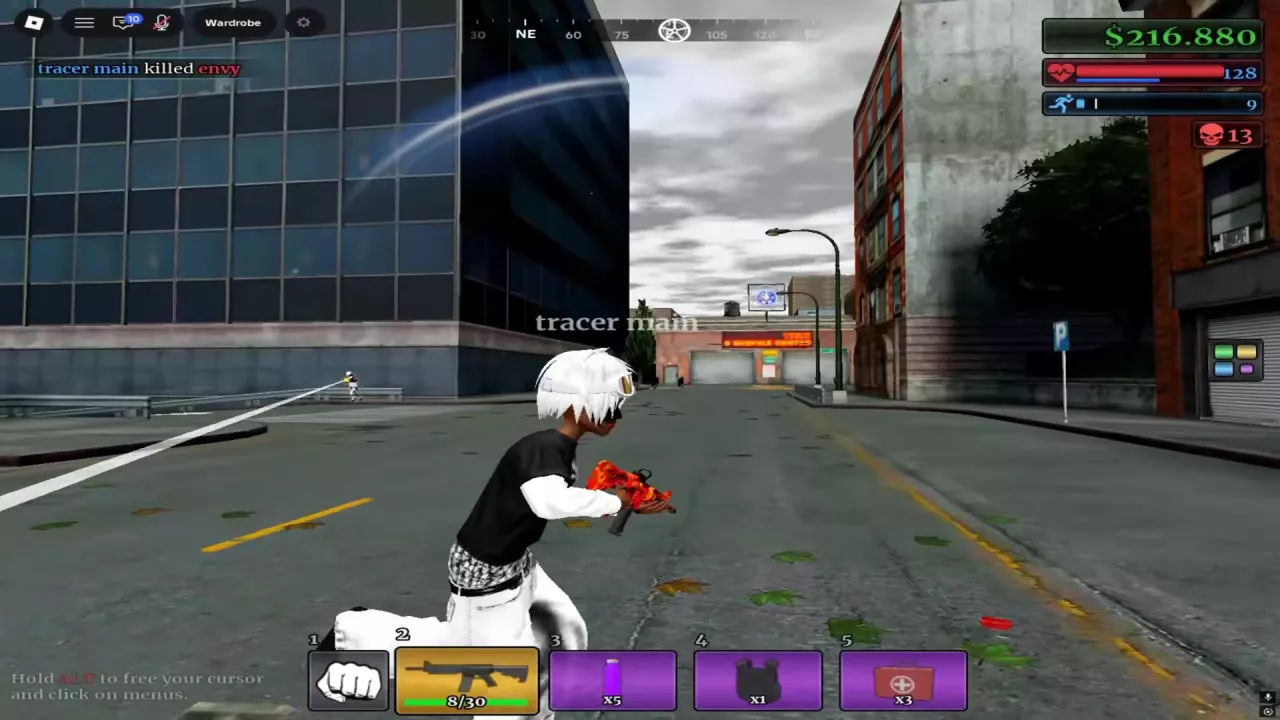
Street combat with the numbered hotbar, rifle ammunition count and ALT cursor prompt visible.
On this page

Open Urban Reload on Roblox

Open the official Urban Reload experience page on Roblox to access the game.

During the testing phase discussed in the original beta-access video, access required joining the Discord community linked in the video description.

Fight, Loot and Build Your Equipment

Street PvP connects combat with equipment progression: take down an enemy, then loot their gun. Fighting and farming also provide ways to build up cash, while guns, attachments and rare camos give you equipment and collection goals.

Your own weapons can be lost, so consider what you are carrying before committing to a fight. When you have a weapon you want to keep, favor an engagement with nearby cover and room to reposition over an exposed chase.

Prepare for Your First Street Fights

  1. Identify your current hotbar items. Find your firearm and any supplies you already have. Use the icons and on-screen prompts to locate them; slot layouts can differ. Keep your gun and recovery supplies easy to switch between.
  2. Check your ammunition. Read the current rounds against the magazine capacity before engaging, and watch the count as you fire. Use the weapon and ammo HUD reference for help identifying guns and reading their displays.
  3. Carry a MEDKIT if you have one. Look for the red handled medical case with a white cross. When injured between exchanges, switch to it, begin treatment and let the healing progress bar finish. You can move during treatment. The supplies guide explains healing and the other supply items.
  4. Choose nearby cover. Use building corners and raised tree planters to break up exposed movement and change position during a fight. Continue with the street PvP guide for aiming, repositioning and handling repeated encounters.

To click menus on the keyboard interface with the ALT prompt, hold ALT to release the mouse cursor, then click the menu button. The menus and hotbar guide covers the different layouts and entries.

Street combat with the numbered hotbar, rifle ammunition count and ALT cursor prompt visible.

Choose Your Next Goal

  • Build out your equipment or collection. Browse attachments and their case sources for gun parts, or camos for patterns and finishes. Use the case comparison to choose a case for the kind of reward you want.
  • Build up cash. Pursue combat or farming, and use the cash and kill-reward guide to understand cash sources and recognize a PvP payout.
  • Play together through a Crew. Create a Crew for group play. The person icon on the right opens Crew in the layout with that entry; see the menu guide for orientation.
  • Work toward a personal car. Urban Reload supports unlocking and customizing your own vehicles.
  • Compete on the global leaderboards. Make climbing the rankings a longer-term competitive goal.

Search the wiki

Urban Reload Beginner Guide: Getting StartedStart Urban Reload on Roblox, learn how fighting, looting and cash fit together, and prepare your hotbar, ammo and healing supplies before street PvP.How to Open the Menu in Urban Reload and Read Your HotbarHold ALT to unlock the cursor in Urban Reload, then click a menu. Find Crew and Shop and recognize the numbered and L1/R1 hotbar layouts.Urban Reload Combat Guide: Street PvPImprove street PvP in Urban Reload with a practical loadout, aiming tips, corner movement, flank responses, knockdown recognition and Medkit healing.Urban Reload Combat Supplies: Medkit and Purple BottleIdentify Urban Reload combat supplies, heal with a Medkit, and use the purple bottle’s 15-second status timer, including how drinking again refreshes it.
How to Open the Menu in Urban Reload and Read Your HotbarHold ALT to unlock the cursor in Urban Reload, then click a menu. Find Crew and Shop and recognize the numbered and L1/R1 hotbar layouts.Urban Reload Weapon Types, M4 and Ammo HUDIdentify Urban Reload weapon types, check the M4 beta setup’s 30-round magazine, read the ammo HUD, and understand weapon loss and the weapon-roll timer.Urban Reload Combat Supplies: Medkit and Purple BottleIdentify Urban Reload combat supplies, heal with a Medkit, and use the purple bottle’s 15-second status timer, including how drinking again refreshes it.
Urban Reload Combat Guide: Street PvPImprove street PvP in Urban Reload with a practical loadout, aiming tips, corner movement, flank responses, knockdown recognition and Medkit healing.Urban Reload Combat Supplies: Medkit and Purple BottleIdentify Urban Reload combat supplies, heal with a Medkit, and use the purple bottle’s 15-second status timer, including how drinking again refreshes it.Urban Reload Kill Rewards and Cash SourcesLearn how Urban Reload kill rewards work: confirm PvP kills, read green cash payouts, compare individual reward examples, and recognize the Farm Zone marker.Urban Reload Weapon Types, M4 and Ammo HUDIdentify Urban Reload weapon types, check the M4 beta setup’s 30-round magazine, read the ammo HUD, and understand weapon loss and the weapon-roll timer.
Urban Reload Weapon Types, M4 and Ammo HUDIdentify Urban Reload weapon types, check the M4 beta setup’s 30-round magazine, read the ammo HUD, and understand weapon loss and the weapon-roll timer.Urban Reload Attachment List and Case SourcesBrowse 10 Urban Reload attachments by name, type and case. Find the case for Suppressor, Double Drum, grips, lasers, muzzle devices and Flashlight.Urban Reload Combat Guide: Street PvPImprove street PvP in Urban Reload with a practical loadout, aiming tips, corner movement, flank responses, knockdown recognition and Medkit healing.
Urban Reload Attachment List and Case SourcesBrowse 10 Urban Reload attachments by name, type and case. Find the case for Suppressor, Double Drum, grips, lasers, muzzle devices and Flashlight.Urban Reload Cases: Types and Reward ChoicesChoose Urban Reload cases for DarkMatter, White Chrome, Suppressor or Double Drum. Compare reward candidates, read YOU GOT results and find the animation-skip pass.
Urban Reload Combat Supplies: Medkit and Purple BottleIdentify Urban Reload combat supplies, heal with a Medkit, and use the purple bottle’s 15-second status timer, including how drinking again refreshes it.Urban Reload Weapon Types, M4 and Ammo HUDIdentify Urban Reload weapon types, check the M4 beta setup’s 30-round magazine, read the ammo HUD, and understand weapon loss and the weapon-roll timer.Urban Reload Combat Guide: Street PvPImprove street PvP in Urban Reload with a practical loadout, aiming tips, corner movement, flank responses, knockdown recognition and Medkit healing.
Urban Reload Combat Supplies: Medkit and Purple BottleIdentify Urban Reload combat supplies, heal with a Medkit, and use the purple bottle’s 15-second status timer, including how drinking again refreshes it.Urban Reload Combat Guide: Street PvPImprove street PvP in Urban Reload with a practical loadout, aiming tips, corner movement, flank responses, knockdown recognition and Medkit healing.How to Open the Menu in Urban Reload and Read Your HotbarHold ALT to unlock the cursor in Urban Reload, then click a menu. Find Crew and Shop and recognize the numbered and L1/R1 hotbar layouts.
Urban Reload Kill Rewards and Cash SourcesLearn how Urban Reload kill rewards work: confirm PvP kills, read green cash payouts, compare individual reward examples, and recognize the Farm Zone marker.Urban Reload Locations: Farm Zone, Pharmacy and Safe ZoneFind Urban Reload locations using the Farm Zone skull marker, Gem Dealers sign and pharmacy plaza. Recognize Central Pharmacy and the Safe Zone interior.
Urban Reload Cases: Types and Reward ChoicesChoose Urban Reload cases for DarkMatter, White Chrome, Suppressor or Double Drum. Compare reward candidates, read YOU GOT results and find the animation-skip pass.Urban Reload Attachment List and Case SourcesBrowse 10 Urban Reload attachments by name, type and case. Find the case for Suppressor, Double Drum, grips, lasers, muzzle devices and Flashlight.Urban Reload Camos: Patterns, Finishes and Case SourcesBrowse 10 Urban Reload camos by name, appearance and case source. Find DarkMatter, White Chrome, patterned wraps and colored Gloss finishes.Urban Reload Game Passes and Robux PricesFind Urban Reload game pass listings, Robux prices and official product links. Compare Crew-related prices and find the permanent case-animation skip pass.
Urban Reload Camos: Patterns, Finishes and Case SourcesBrowse 10 Urban Reload camos by name, appearance and case source. Find DarkMatter, White Chrome, patterned wraps and colored Gloss finishes.Urban Reload Cases: Types and Reward ChoicesChoose Urban Reload cases for DarkMatter, White Chrome, Suppressor or Double Drum. Compare reward candidates, read YOU GOT results and find the animation-skip pass.Urban Reload Creator Perks: Skies, Tracers and Kill EffectsLearn why some Urban Reload creators have custom skies, bullet tracers and chosen kill effects, and how these perks differ from gun camos.
Urban Reload Locations: Farm Zone, Pharmacy and Safe ZoneFind Urban Reload locations using the Farm Zone skull marker, Gem Dealers sign and pharmacy plaza. Recognize Central Pharmacy and the Safe Zone interior.Urban Reload Kill Rewards and Cash SourcesLearn how Urban Reload kill rewards work: confirm PvP kills, read green cash payouts, compare individual reward examples, and recognize the Farm Zone marker.
Urban Reload Game Passes and Robux PricesFind Urban Reload game pass listings, Robux prices and official product links. Compare Crew-related prices and find the permanent case-animation skip pass.How to Open the Menu in Urban Reload and Read Your HotbarHold ALT to unlock the cursor in Urban Reload, then click a menu. Find Crew and Shop and recognize the numbered and L1/R1 hotbar layouts.
Urban Reload Game Passes and Robux PricesFind Urban Reload game pass listings, Robux prices and official product links. Compare Crew-related prices and find the permanent case-animation skip pass.Urban Reload Cases: Types and Reward ChoicesChoose Urban Reload cases for DarkMatter, White Chrome, Suppressor or Double Drum. Compare reward candidates, read YOU GOT results and find the animation-skip pass.
Urban Reload Creator Perks: Skies, Tracers and Kill EffectsLearn why some Urban Reload creators have custom skies, bullet tracers and chosen kill effects, and how these perks differ from gun camos.Urban Reload Camos: Patterns, Finishes and Case SourcesBrowse 10 Urban Reload camos by name, appearance and case source. Find DarkMatter, White Chrome, patterned wraps and colored Gloss finishes.