
Combat / PLAYER GUIDE

Urban Reload Combat Guide: Street PvP

Last updated:

Street fights in Urban Reload can draw in another attacker before your first exchange ends. Keep recovery supplies ready, track moving opponents and use nearby corners and planters to change your position.
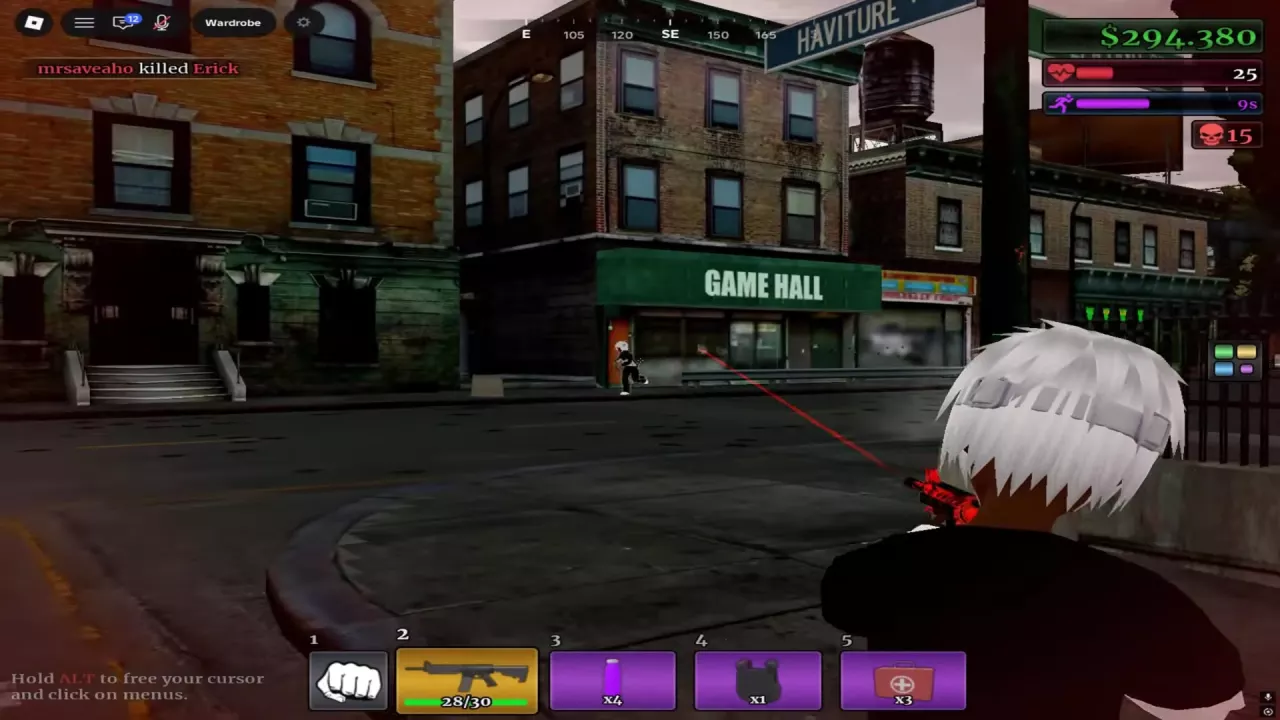
Over-the-shoulder rifle aim toward an opponent across the street outside GAME HALL.
On this page

Keep a Rifle and Recovery Supplies Ready

If you already have the weapon and supplies, use this carrying example for repeated street fights:

  • Rifle: keep it ready for engagements in streets and plazas. The M4 is one option for this role.
  • Purple Bottle: identify it by its glowing purple body and pale cap.
  • Black Armor Vest: identify it by the black vest icon with shoulder straps.
  • MEDKIT: carry the red medical case with a white cross for health recovery between exchanges.

In the numbered five-slot layout, this example places fists first, followed by the rifle, Purple Bottle, Black Armor Vest and MEDKIT. Keep the rifle and MEDKIT easy to switch between; use the hotbar controls guide if you need help switching items.

For M4 setup details and ammunition indicators, see the weapon reference.

Track Close Targets and Line Up Street Shots

  • At close range: keep turning with your opponent while you move. Adjust your aim as they change direction or jump, especially during fights in an open plaza.
  • Across a street: use the over-the-shoulder view to line up the target before firing. At the GAME HALL entrance, for example, aim across the road toward the opponent outside the storefront.

Keep adjusting your aim as the target moves. If the fight shifts farther along the sidewalk, relocate along the buildings to find another firing angle.

Over-the-shoulder rifle aim toward an opponent across the street outside GAME HALL.

Change Angles Around Corners and Planters

Use building corners, tree planters and low walls to change the angle of an exchange. When you take fire, move around the tree or nearby corner and reposition before continuing to shoot. From a building corner, watch the street before moving back into the fighting area.

If another player attacks from behind:

  1. Turn to locate the additional attacker.
  2. Move through the plaza or around the planters as you adjust your aim and return fire.
  3. Reassess both attackers before committing to the original target again.

Your carried weapon is at risk of being lost, and defeated enemies can be looted for guns. If you are hurt or caught between attackers, favor repositioning and recovery over continuing the same exchange from an exposed position.
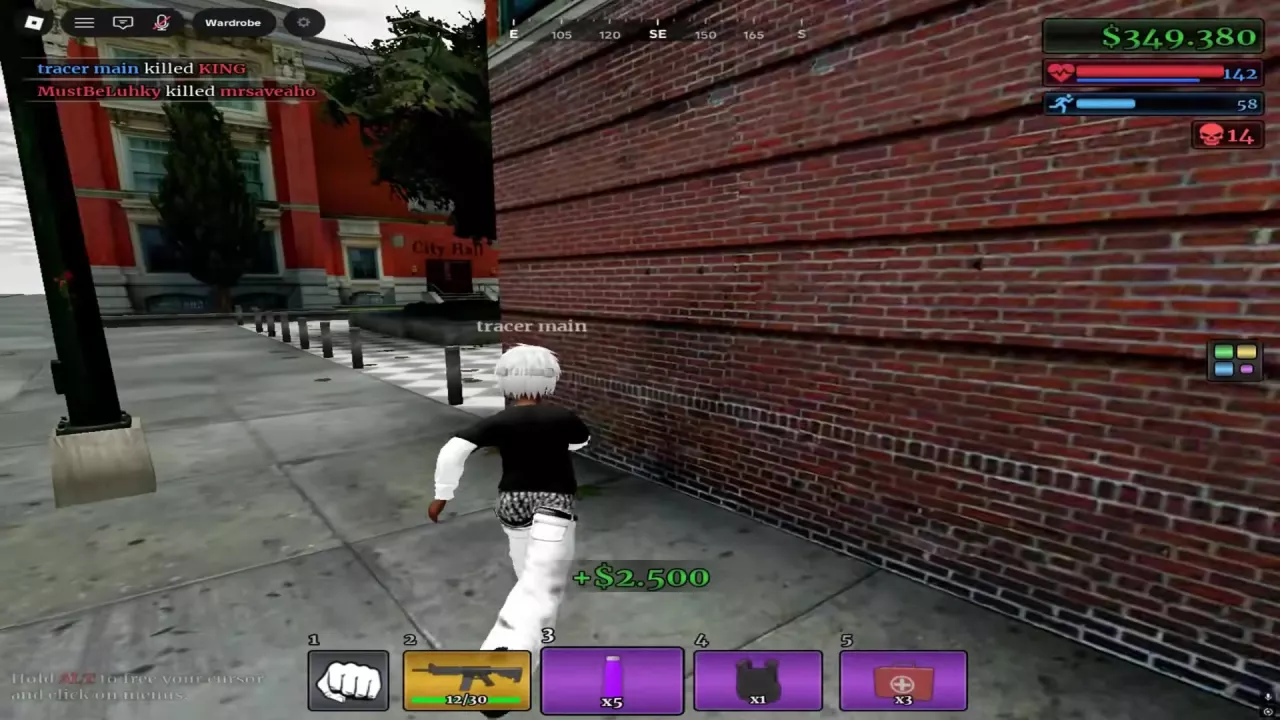
Player moving beside a brick building corner near City Hall.

Recognize a Knockdown and Confirm the Kill

A downed character lies on the ground with a red cross marker, and the screen edges can turn red. A downed player can still have a small amount of health, so the red cross alone does not confirm a completed kill.

To finish a downed opponent:

  1. Keep a firearm with ammunition equipped.
  2. Aim at the downed target and continue firing.
  3. Check the kill feed for an entry naming you as the killer and that opponent as the defeated player.

Once the kill is confirmed, use the cash and kill rewards guide to understand the payout indicators.
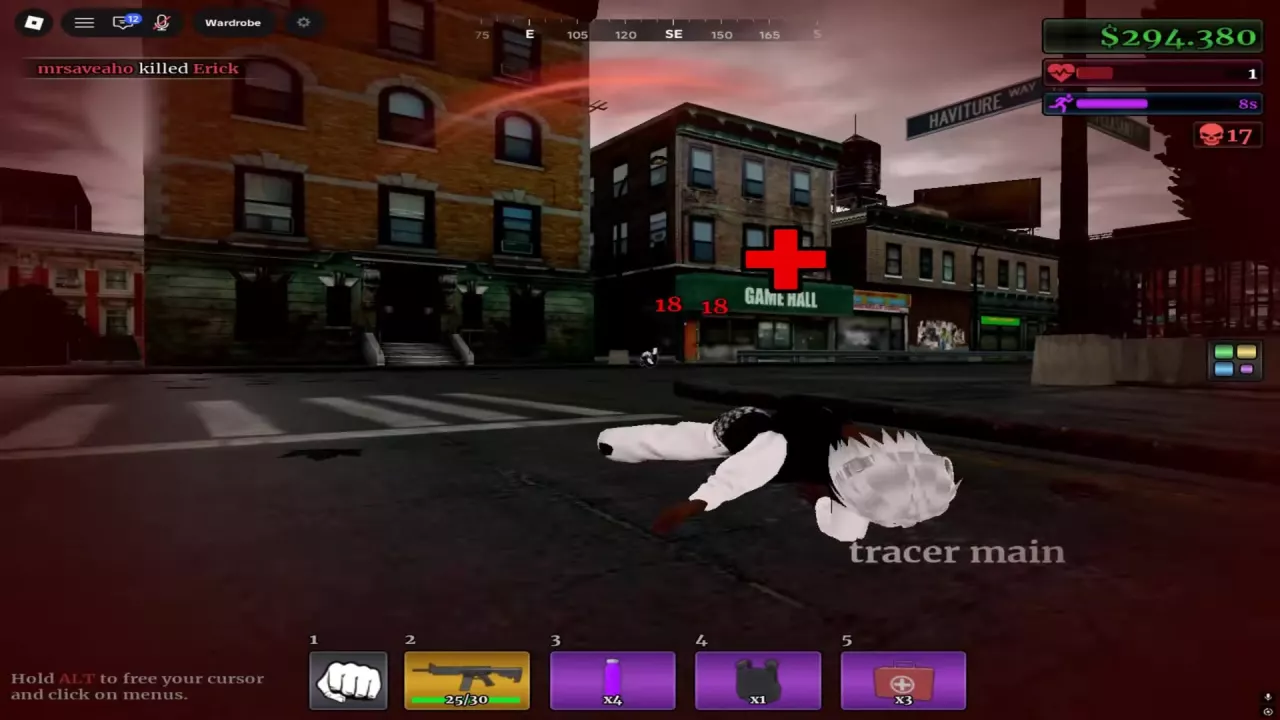
Downed character on the street with a red cross marker and red screen edges.

Heal Between Exchanges

When you are injured but still able to move, use a MEDKIT between exchanges:

  1. Select the red MEDKIT from your hotbar and use it.
  2. Let the healing progress bar finish. You can keep moving while treatment progresses.
  3. Once treatment completes, one MEDKIT is consumed and health is restored. Switch back to your rifle before the next exchange.

For the meaning of the MEDKIT +100 prompt and the Purple Bottle's consumption and timer refresh behavior, see the combat supplies guide.
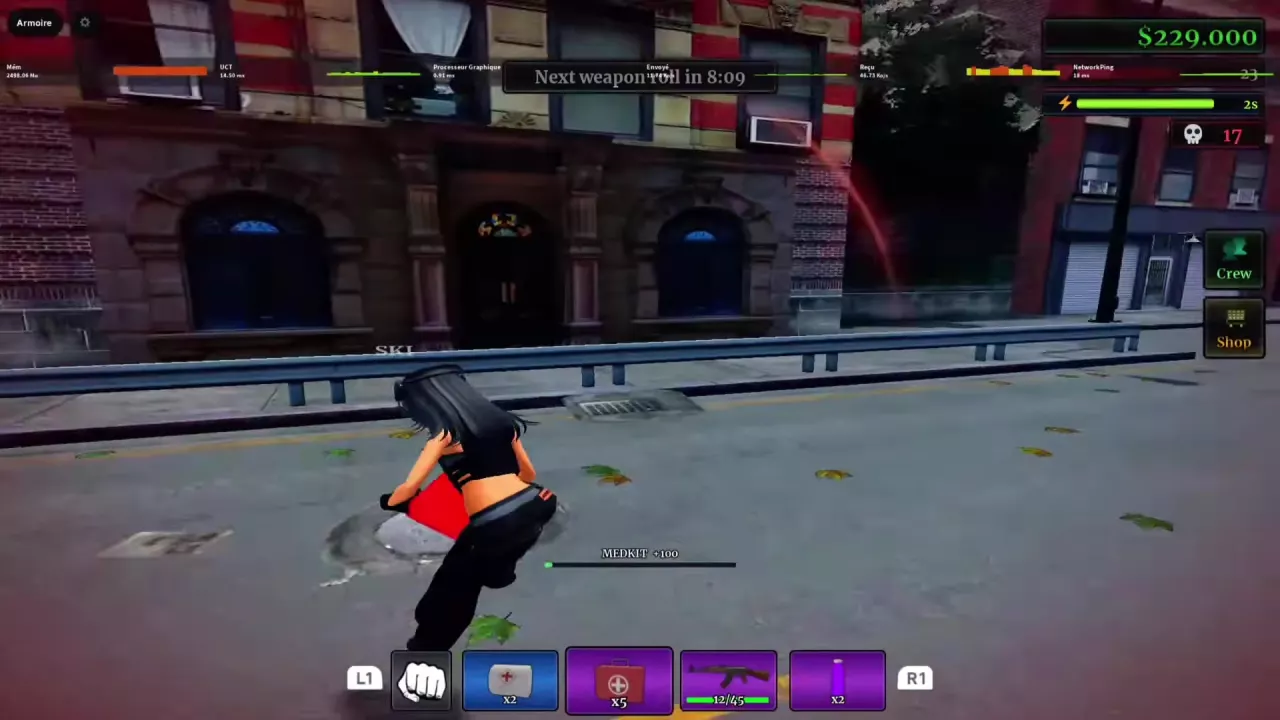
Player holding a red MEDKIT while the healing progress bar runs.

Search the wiki

Urban Reload Beginner Guide: Getting StartedStart Urban Reload on Roblox, learn how fighting, looting and cash fit together, and prepare your hotbar, ammo and healing supplies before street PvP.How to Open the Menu in Urban Reload and Read Your HotbarHold ALT to unlock the cursor in Urban Reload, then click a menu. Find Crew and Shop and recognize the numbered and L1/R1 hotbar layouts.Urban Reload Combat Guide: Street PvPImprove street PvP in Urban Reload with a practical loadout, aiming tips, corner movement, flank responses, knockdown recognition and Medkit healing.Urban Reload Combat Supplies: Medkit and Purple BottleIdentify Urban Reload combat supplies, heal with a Medkit, and use the purple bottle’s 15-second status timer, including how drinking again refreshes it.
How to Open the Menu in Urban Reload and Read Your HotbarHold ALT to unlock the cursor in Urban Reload, then click a menu. Find Crew and Shop and recognize the numbered and L1/R1 hotbar layouts.Urban Reload Weapon Types, M4 and Ammo HUDIdentify Urban Reload weapon types, check the M4 beta setup’s 30-round magazine, read the ammo HUD, and understand weapon loss and the weapon-roll timer.Urban Reload Combat Supplies: Medkit and Purple BottleIdentify Urban Reload combat supplies, heal with a Medkit, and use the purple bottle’s 15-second status timer, including how drinking again refreshes it.
Urban Reload Combat Guide: Street PvPImprove street PvP in Urban Reload with a practical loadout, aiming tips, corner movement, flank responses, knockdown recognition and Medkit healing.Urban Reload Combat Supplies: Medkit and Purple BottleIdentify Urban Reload combat supplies, heal with a Medkit, and use the purple bottle’s 15-second status timer, including how drinking again refreshes it.Urban Reload Kill Rewards and Cash SourcesLearn how Urban Reload kill rewards work: confirm PvP kills, read green cash payouts, compare individual reward examples, and recognize the Farm Zone marker.Urban Reload Weapon Types, M4 and Ammo HUDIdentify Urban Reload weapon types, check the M4 beta setup’s 30-round magazine, read the ammo HUD, and understand weapon loss and the weapon-roll timer.
Urban Reload Weapon Types, M4 and Ammo HUDIdentify Urban Reload weapon types, check the M4 beta setup’s 30-round magazine, read the ammo HUD, and understand weapon loss and the weapon-roll timer.Urban Reload Attachment List and Case SourcesBrowse 10 Urban Reload attachments by name, type and case. Find the case for Suppressor, Double Drum, grips, lasers, muzzle devices and Flashlight.Urban Reload Combat Guide: Street PvPImprove street PvP in Urban Reload with a practical loadout, aiming tips, corner movement, flank responses, knockdown recognition and Medkit healing.
Urban Reload Attachment List and Case SourcesBrowse 10 Urban Reload attachments by name, type and case. Find the case for Suppressor, Double Drum, grips, lasers, muzzle devices and Flashlight.Urban Reload Cases: Types and Reward ChoicesChoose Urban Reload cases for DarkMatter, White Chrome, Suppressor or Double Drum. Compare reward candidates, read YOU GOT results and find the animation-skip pass.
Urban Reload Combat Supplies: Medkit and Purple BottleIdentify Urban Reload combat supplies, heal with a Medkit, and use the purple bottle’s 15-second status timer, including how drinking again refreshes it.Urban Reload Weapon Types, M4 and Ammo HUDIdentify Urban Reload weapon types, check the M4 beta setup’s 30-round magazine, read the ammo HUD, and understand weapon loss and the weapon-roll timer.Urban Reload Combat Guide: Street PvPImprove street PvP in Urban Reload with a practical loadout, aiming tips, corner movement, flank responses, knockdown recognition and Medkit healing.
Urban Reload Combat Supplies: Medkit and Purple BottleIdentify Urban Reload combat supplies, heal with a Medkit, and use the purple bottle’s 15-second status timer, including how drinking again refreshes it.Urban Reload Combat Guide: Street PvPImprove street PvP in Urban Reload with a practical loadout, aiming tips, corner movement, flank responses, knockdown recognition and Medkit healing.How to Open the Menu in Urban Reload and Read Your HotbarHold ALT to unlock the cursor in Urban Reload, then click a menu. Find Crew and Shop and recognize the numbered and L1/R1 hotbar layouts.
Urban Reload Kill Rewards and Cash SourcesLearn how Urban Reload kill rewards work: confirm PvP kills, read green cash payouts, compare individual reward examples, and recognize the Farm Zone marker.Urban Reload Locations: Farm Zone, Pharmacy and Safe ZoneFind Urban Reload locations using the Farm Zone skull marker, Gem Dealers sign and pharmacy plaza. Recognize Central Pharmacy and the Safe Zone interior.
Urban Reload Cases: Types and Reward ChoicesChoose Urban Reload cases for DarkMatter, White Chrome, Suppressor or Double Drum. Compare reward candidates, read YOU GOT results and find the animation-skip pass.Urban Reload Attachment List and Case SourcesBrowse 10 Urban Reload attachments by name, type and case. Find the case for Suppressor, Double Drum, grips, lasers, muzzle devices and Flashlight.Urban Reload Camos: Patterns, Finishes and Case SourcesBrowse 10 Urban Reload camos by name, appearance and case source. Find DarkMatter, White Chrome, patterned wraps and colored Gloss finishes.Urban Reload Game Passes and Robux PricesFind Urban Reload game pass listings, Robux prices and official product links. Compare Crew-related prices and find the permanent case-animation skip pass.
Urban Reload Camos: Patterns, Finishes and Case SourcesBrowse 10 Urban Reload camos by name, appearance and case source. Find DarkMatter, White Chrome, patterned wraps and colored Gloss finishes.Urban Reload Cases: Types and Reward ChoicesChoose Urban Reload cases for DarkMatter, White Chrome, Suppressor or Double Drum. Compare reward candidates, read YOU GOT results and find the animation-skip pass.Urban Reload Creator Perks: Skies, Tracers and Kill EffectsLearn why some Urban Reload creators have custom skies, bullet tracers and chosen kill effects, and how these perks differ from gun camos.
Urban Reload Locations: Farm Zone, Pharmacy and Safe ZoneFind Urban Reload locations using the Farm Zone skull marker, Gem Dealers sign and pharmacy plaza. Recognize Central Pharmacy and the Safe Zone interior.Urban Reload Kill Rewards and Cash SourcesLearn how Urban Reload kill rewards work: confirm PvP kills, read green cash payouts, compare individual reward examples, and recognize the Farm Zone marker.
Urban Reload Game Passes and Robux PricesFind Urban Reload game pass listings, Robux prices and official product links. Compare Crew-related prices and find the permanent case-animation skip pass.How to Open the Menu in Urban Reload and Read Your HotbarHold ALT to unlock the cursor in Urban Reload, then click a menu. Find Crew and Shop and recognize the numbered and L1/R1 hotbar layouts.
Urban Reload Game Passes and Robux PricesFind Urban Reload game pass listings, Robux prices and official product links. Compare Crew-related prices and find the permanent case-animation skip pass.Urban Reload Cases: Types and Reward ChoicesChoose Urban Reload cases for DarkMatter, White Chrome, Suppressor or Double Drum. Compare reward candidates, read YOU GOT results and find the animation-skip pass.
Urban Reload Creator Perks: Skies, Tracers and Kill EffectsLearn why some Urban Reload creators have custom skies, bullet tracers and chosen kill effects, and how these perks differ from gun camos.Urban Reload Camos: Patterns, Finishes and Case SourcesBrowse 10 Urban Reload camos by name, appearance and case source. Find DarkMatter, White Chrome, patterned wraps and colored Gloss finishes.