
Combat Supplies / PLAYER GUIDE

Urban Reload Combat Supplies: Medkit and Purple Bottle

Last updated:

Distinguish the red Medkit from the white medical pouch, recognize the armor vest, and use your healing supplies and purple bottles during combat.
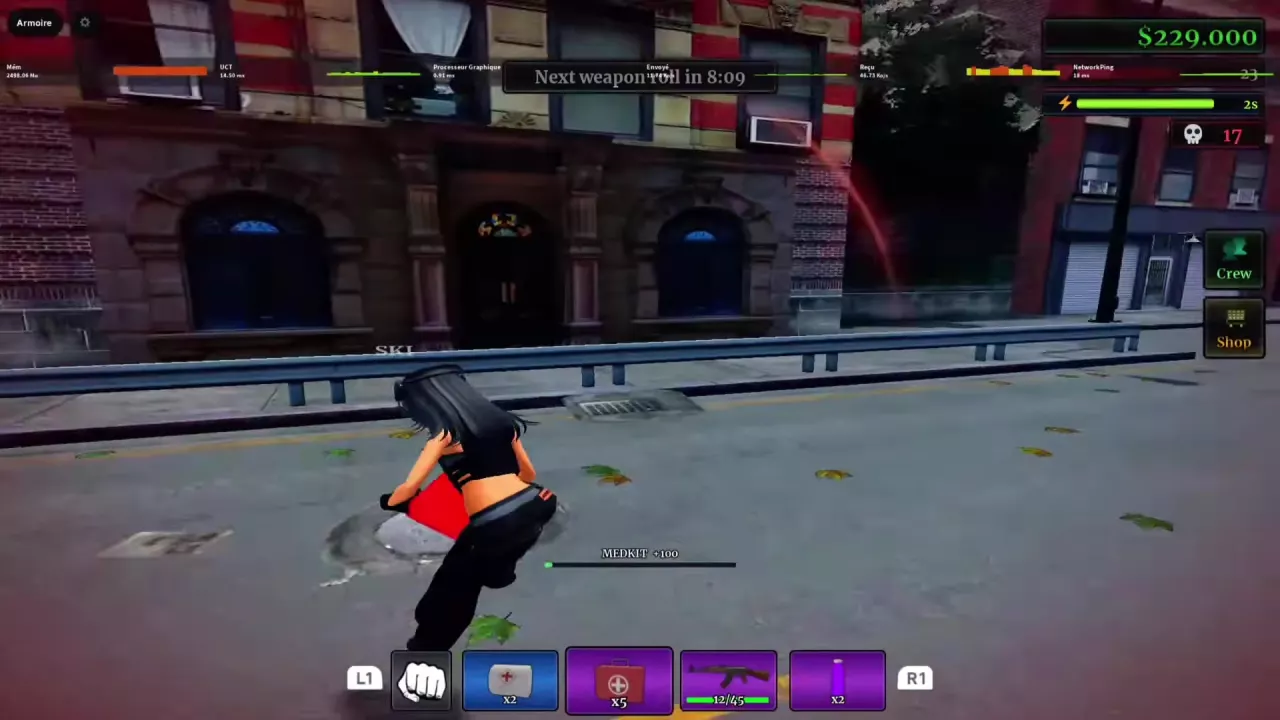
Character moving with a red Medkit while the MEDKIT +100 healing progress bar is active.
On this page

Identify Your Supplies

Use the appearance descriptions below to distinguish the four supplies.

In the numbered five-slot layout, the purple bottle occupies slot 3, the black armor vest slot 4, and the red Medkit slot 5. In the layout with L1/R1 prompts, the white medical pouch and red Medkit occupy separate slots. Match the item’s appearance to your current layout when selecting it.

For help switching equipment or opening menus, see the menus and hotbar guide.

Medical Supplies
NameAppearance
Medkit
Red handled medical case with a white cross.
White Medical Pouch
White soft pouch bearing a red cross.

Medkit

Use
Complete the healing progress bar to restore health; movement is possible during treatment.
Displayed healing amount
100 health (MEDKIT +100 use prompt; this is the displayed amount, not the net health gained in every use.)
Consumed per completed treatment
1 Medkit
Example health before treatment
23 health (Healing example ending at 100 health.)
Example health after treatment
100 health (Healing example starting at 23 health.)
Example net healing
77 health (100 − 23 in the same completed treatment.)
Hotbar slot
5 (Numbered five-slot layout.)

White Medical Pouch

Hotbar identification
Occupies a separate slot from the red Medkit. (Hotbar layout with L1 and R1 prompts.)

Bottled Supplies

Purple Bottle

Appearance
Glowing purple bottle with a pale cap.
Consumed per drink
1 bottle (Completed use.)
Status timer after drinking
15 seconds (Starts a status or refreshes an active countdown.)
Refresh behavior
Returns the countdown to 15 seconds; examples include two seconds and approximately four seconds remaining. (Running-icon status display.)
Lightning bar behavior
The lightning bar increases and its countdown returns to 15 seconds; examples start at three or five seconds. (Lightning-icon status display.)
Status appearance
Purple ring or aura around the character; a purple countdown beside the running icon in the numbered-hotbar interface.
Movement while drinking
Yes
After switching to a weapon
The status countdown continues.
While downed
The aura and countdown can remain visible after being downed. (An active status does not prevent being downed.)
Immediate health change
Health stayed unchanged at activation in the repeated-use examples. (Examples of two drinks.)
Hotbar slot
3 (Numbered five-slot layout.)

Armor

Black Armor Vest

Appearance
Black protective vest icon with shoulder straps.
Hotbar slot
4 (Numbered five-slot layout.)
  • Medkit

    Appearance
    Red handled medical case with a white cross.
  • White Medical Pouch

    Appearance
    White soft pouch bearing a red cross.
  • Purple Bottle

    Appearance
    Glowing purple bottle with a pale cap.
  • Black Armor Vest

    Appearance
    Black protective vest icon with shoulder straps.

Use a Medkit to Restore Health

Have a red Medkit available in your hotbar before starting treatment.

  1. Select the red medical case and use it.
  2. Look for MEDKIT +100 and the healing progress bar. You can move while treatment progresses.
  3. Let the progress bar finish. Completing treatment consumes one Medkit and restores health.

For positioning and movement between heals, see the street PvP guide.

Character moving with a red Medkit while the MEDKIT +100 healing progress bar is active.

Understand the MEDKIT +100 Prompt

MEDKIT +100 does not mean every treatment adds 100 health. In a completed treatment starting at 23 health and ending at 100 health, the actual gain is 77 health: 100 − 23 = 77.

Those values describe that treatment’s starting and ending health. Read your health before and after treatment to determine your actual recovery; the prompt itself is not the net amount gained.

Drink the Purple Bottle and Return to Your Weapon

Have a purple bottle available in your hotbar.

  1. Select the glowing purple bottle and use it to begin drinking.
  2. Let the drinking action complete. You can move while drinking. One bottle is consumed, a purple ring or aura appears around your character, and the status timer starts at 15 seconds.
  3. Switch back to your weapon. The countdown continues while you hold and use the weapon.

Recognize the status display in your interface:

Status icon What changes when you drink
Running figure The blue numeric bar changes to a purple countdown starting at 15 seconds.
Lightning bolt The lightning bar increases and its timer returns to 15 seconds.

Refresh the Timer to 15 Seconds

Drink another bottle during an active countdown to refresh it to 15 seconds, consuming one more bottle. With 2 seconds remaining, completing another drink returns the running-icon timer to 15 seconds. It replaces the remaining time rather than adding another 15 seconds.

Watch the countdown before spending another bottle. Letting it run lower preserves more of the time you already have; refresh sooner when maintaining the active status matters more than conserving bottles. Movement does not stop the refreshed countdown.

On repeat uses, the aura and timer can activate without an immediate health increase. The status also does not prevent you from being downed: its aura and countdown can remain visible afterward.
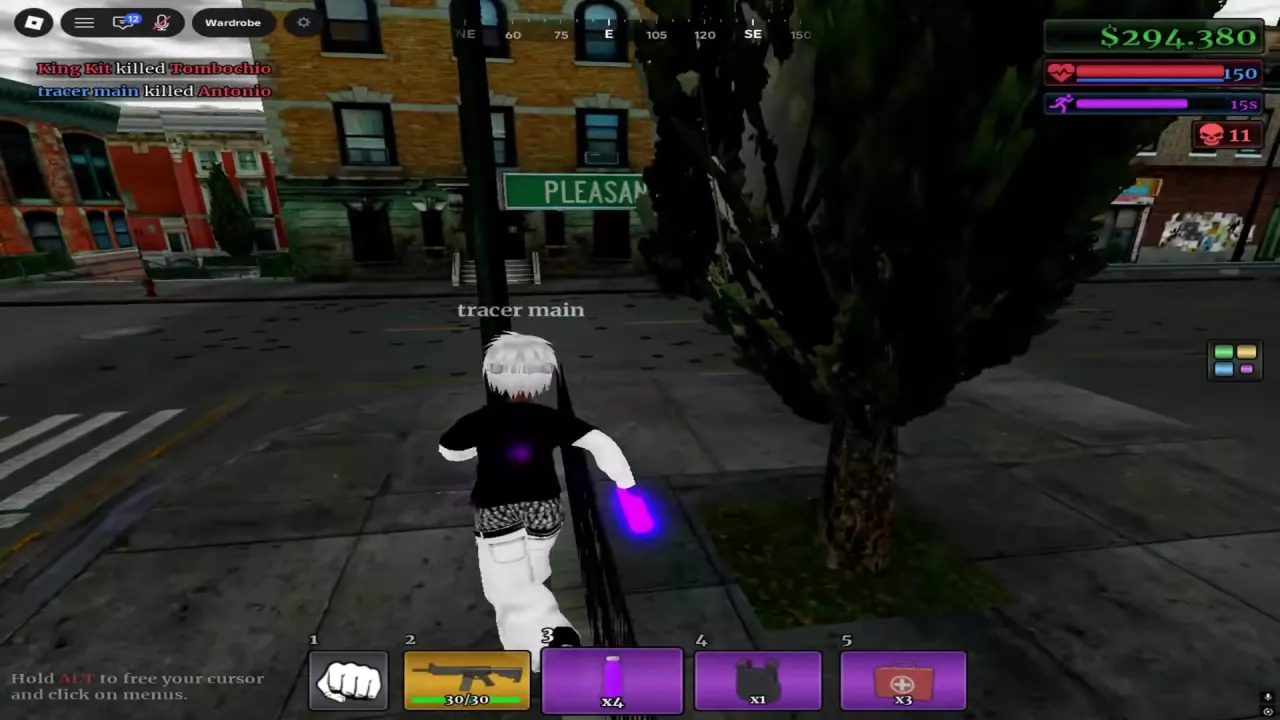
Character holding a glowing purple bottle with four bottles remaining and a purple 15-second status timer.

Search the wiki

Urban Reload Beginner Guide: Getting StartedStart Urban Reload on Roblox, learn how fighting, looting and cash fit together, and prepare your hotbar, ammo and healing supplies before street PvP.How to Open the Menu in Urban Reload and Read Your HotbarHold ALT to unlock the cursor in Urban Reload, then click a menu. Find Crew and Shop and recognize the numbered and L1/R1 hotbar layouts.Urban Reload Combat Guide: Street PvPImprove street PvP in Urban Reload with a practical loadout, aiming tips, corner movement, flank responses, knockdown recognition and Medkit healing.Urban Reload Combat Supplies: Medkit and Purple BottleIdentify Urban Reload combat supplies, heal with a Medkit, and use the purple bottle’s 15-second status timer, including how drinking again refreshes it.
How to Open the Menu in Urban Reload and Read Your HotbarHold ALT to unlock the cursor in Urban Reload, then click a menu. Find Crew and Shop and recognize the numbered and L1/R1 hotbar layouts.Urban Reload Weapon Types, M4 and Ammo HUDIdentify Urban Reload weapon types, check the M4 beta setup’s 30-round magazine, read the ammo HUD, and understand weapon loss and the weapon-roll timer.Urban Reload Combat Supplies: Medkit and Purple BottleIdentify Urban Reload combat supplies, heal with a Medkit, and use the purple bottle’s 15-second status timer, including how drinking again refreshes it.
Urban Reload Combat Guide: Street PvPImprove street PvP in Urban Reload with a practical loadout, aiming tips, corner movement, flank responses, knockdown recognition and Medkit healing.Urban Reload Combat Supplies: Medkit and Purple BottleIdentify Urban Reload combat supplies, heal with a Medkit, and use the purple bottle’s 15-second status timer, including how drinking again refreshes it.Urban Reload Kill Rewards and Cash SourcesLearn how Urban Reload kill rewards work: confirm PvP kills, read green cash payouts, compare individual reward examples, and recognize the Farm Zone marker.Urban Reload Weapon Types, M4 and Ammo HUDIdentify Urban Reload weapon types, check the M4 beta setup’s 30-round magazine, read the ammo HUD, and understand weapon loss and the weapon-roll timer.
Urban Reload Weapon Types, M4 and Ammo HUDIdentify Urban Reload weapon types, check the M4 beta setup’s 30-round magazine, read the ammo HUD, and understand weapon loss and the weapon-roll timer.Urban Reload Attachment List and Case SourcesBrowse 10 Urban Reload attachments by name, type and case. Find the case for Suppressor, Double Drum, grips, lasers, muzzle devices and Flashlight.Urban Reload Combat Guide: Street PvPImprove street PvP in Urban Reload with a practical loadout, aiming tips, corner movement, flank responses, knockdown recognition and Medkit healing.
Urban Reload Attachment List and Case SourcesBrowse 10 Urban Reload attachments by name, type and case. Find the case for Suppressor, Double Drum, grips, lasers, muzzle devices and Flashlight.Urban Reload Cases: Types and Reward ChoicesChoose Urban Reload cases for DarkMatter, White Chrome, Suppressor or Double Drum. Compare reward candidates, read YOU GOT results and find the animation-skip pass.
Urban Reload Combat Supplies: Medkit and Purple BottleIdentify Urban Reload combat supplies, heal with a Medkit, and use the purple bottle’s 15-second status timer, including how drinking again refreshes it.Urban Reload Weapon Types, M4 and Ammo HUDIdentify Urban Reload weapon types, check the M4 beta setup’s 30-round magazine, read the ammo HUD, and understand weapon loss and the weapon-roll timer.Urban Reload Combat Guide: Street PvPImprove street PvP in Urban Reload with a practical loadout, aiming tips, corner movement, flank responses, knockdown recognition and Medkit healing.
Urban Reload Combat Supplies: Medkit and Purple BottleIdentify Urban Reload combat supplies, heal with a Medkit, and use the purple bottle’s 15-second status timer, including how drinking again refreshes it.Urban Reload Combat Guide: Street PvPImprove street PvP in Urban Reload with a practical loadout, aiming tips, corner movement, flank responses, knockdown recognition and Medkit healing.How to Open the Menu in Urban Reload and Read Your HotbarHold ALT to unlock the cursor in Urban Reload, then click a menu. Find Crew and Shop and recognize the numbered and L1/R1 hotbar layouts.
Urban Reload Kill Rewards and Cash SourcesLearn how Urban Reload kill rewards work: confirm PvP kills, read green cash payouts, compare individual reward examples, and recognize the Farm Zone marker.Urban Reload Locations: Farm Zone, Pharmacy and Safe ZoneFind Urban Reload locations using the Farm Zone skull marker, Gem Dealers sign and pharmacy plaza. Recognize Central Pharmacy and the Safe Zone interior.
Urban Reload Cases: Types and Reward ChoicesChoose Urban Reload cases for DarkMatter, White Chrome, Suppressor or Double Drum. Compare reward candidates, read YOU GOT results and find the animation-skip pass.Urban Reload Attachment List and Case SourcesBrowse 10 Urban Reload attachments by name, type and case. Find the case for Suppressor, Double Drum, grips, lasers, muzzle devices and Flashlight.Urban Reload Camos: Patterns, Finishes and Case SourcesBrowse 10 Urban Reload camos by name, appearance and case source. Find DarkMatter, White Chrome, patterned wraps and colored Gloss finishes.Urban Reload Game Passes and Robux PricesFind Urban Reload game pass listings, Robux prices and official product links. Compare Crew-related prices and find the permanent case-animation skip pass.
Urban Reload Camos: Patterns, Finishes and Case SourcesBrowse 10 Urban Reload camos by name, appearance and case source. Find DarkMatter, White Chrome, patterned wraps and colored Gloss finishes.Urban Reload Cases: Types and Reward ChoicesChoose Urban Reload cases for DarkMatter, White Chrome, Suppressor or Double Drum. Compare reward candidates, read YOU GOT results and find the animation-skip pass.Urban Reload Creator Perks: Skies, Tracers and Kill EffectsLearn why some Urban Reload creators have custom skies, bullet tracers and chosen kill effects, and how these perks differ from gun camos.
Urban Reload Locations: Farm Zone, Pharmacy and Safe ZoneFind Urban Reload locations using the Farm Zone skull marker, Gem Dealers sign and pharmacy plaza. Recognize Central Pharmacy and the Safe Zone interior.Urban Reload Kill Rewards and Cash SourcesLearn how Urban Reload kill rewards work: confirm PvP kills, read green cash payouts, compare individual reward examples, and recognize the Farm Zone marker.
Urban Reload Game Passes and Robux PricesFind Urban Reload game pass listings, Robux prices and official product links. Compare Crew-related prices and find the permanent case-animation skip pass.How to Open the Menu in Urban Reload and Read Your HotbarHold ALT to unlock the cursor in Urban Reload, then click a menu. Find Crew and Shop and recognize the numbered and L1/R1 hotbar layouts.
Urban Reload Game Passes and Robux PricesFind Urban Reload game pass listings, Robux prices and official product links. Compare Crew-related prices and find the permanent case-animation skip pass.Urban Reload Cases: Types and Reward ChoicesChoose Urban Reload cases for DarkMatter, White Chrome, Suppressor or Double Drum. Compare reward candidates, read YOU GOT results and find the animation-skip pass.
Urban Reload Creator Perks: Skies, Tracers and Kill EffectsLearn why some Urban Reload creators have custom skies, bullet tracers and chosen kill effects, and how these perks differ from gun camos.Urban Reload Camos: Patterns, Finishes and Case SourcesBrowse 10 Urban Reload camos by name, appearance and case source. Find DarkMatter, White Chrome, patterned wraps and colored Gloss finishes.