
Cases / PLAYER GUIDE

Urban Reload Cases: Types and Reward Choices

Last updated:

Urban Reload has separate cases for patterned camos, gloss finishes and two groups of weapon attachments. Choose the case that contains your target reward, then read the result screen to see what you received.

On this page

Choose a Case by the Reward You Want

  • For patterned camos, choose WRAP CAMO CASE. This is the case to target for DarkMatter's purple-and-pink cosmic pattern.
  • For gloss finishes or White Chrome, choose GLOSS CAMO CASE. Pick this category when you want a gloss camo instead of a patterned wrap.
  • For muzzle devices, lasers or a flashlight, choose MUZZLE & LASER CASE. Suppressor belongs to this group.
  • For grips, a bipod or a drum magazine, choose GRIP & MAG CASE. This is the case to target for Double Drum.

Choose by the item you want: each case serves a different reward category.

Case Types and Reward Candidates

These are possible rewards, not guaranteed drops. Opening a case gives you a chance at its candidates rather than a choice of a specific item.

Use the camo directory to compare named patterns and finishes, or the attachment directory to look up individual weapon attachments.

Case Types and Rewards
NameReward type
WRAP CAMO CASE
Patterned camos
GLOSS CAMO CASE
Gloss camos and White Chrome
MUZZLE & LASER CASE
Muzzle devices, lasers and flashlight
GRIP & MAG CASE
Grips, bipod and drum magazine

WRAP CAMO CASE

Reward candidates
Ember, Damascus, Forest, DarkMatter, Stained Glass
Other candidate patterns
A green, yellow and orange multicolored pattern; a green mottled pattern; an orange-and-yellow pattern.
Can award
Ember
Damascus
Forest
DarkMatter
Stained Glass

GLOSS CAMO CASE

Reward candidates
Purple Gloss, Green Gloss, Black Gloss, Blue Gloss, White Chrome
Can award
Purple Gloss
Green Gloss
Black Gloss
Blue Gloss
White Chrome

MUZZLE & LASER CASE

Reward candidates
Compensator, Muzzle Brake, Red Laser, Blue Laser, Suppressor, Flashlight

GRIP & MAG CASE

Reward candidates
Angled Grip, Vertical Grip, Bipod, Double Drum
  • WRAP CAMO CASE

    Reward type
    Patterned camos
    Reward candidates
    Ember, Damascus, Forest, DarkMatter, Stained Glass
    Other candidate patterns
    A green, yellow and orange multicolored pattern; a green mottled pattern; an orange-and-yellow pattern.
  • GLOSS CAMO CASE

    Reward type
    Gloss camos and White Chrome
    Reward candidates
    Purple Gloss, Green Gloss, Black Gloss, Blue Gloss, White Chrome
  • MUZZLE & LASER CASE

    Reward type
    Muzzle devices, lasers and flashlight
    Reward candidates
    Compensator, Muzzle Brake, Red Laser, Blue Laser, Suppressor, Flashlight
  • GRIP & MAG CASE

    Reward type
    Grips, bipod and drum magazine
    Reward candidates
    Angled Grip, Vertical Grip, Bipod, Double Drum

Read the YOU GOT Result

  1. Let the horizontal reward roll finish. Items move beneath a fixed gold pointer in the center. Items passing the pointer during the animation are candidates, not rewards you have received.
  2. Read the final selected card and YOU GOT result. If the large result text is still animating, use the readable name on the card beneath the pointer to identify the item.
  3. Look for NEW. A newly obtained reward can carry this label.

For example, a final DarkMatter card identifies that camo from WRAP; Suppressor identifies the muzzle attachment from MUZZLE & LASER; Double Drum identifies the magazine from GRIP & MAG; and White Chrome identifies the camo from GLOSS. Read the selected item's name even when the reveal effect makes its preview hard to see.
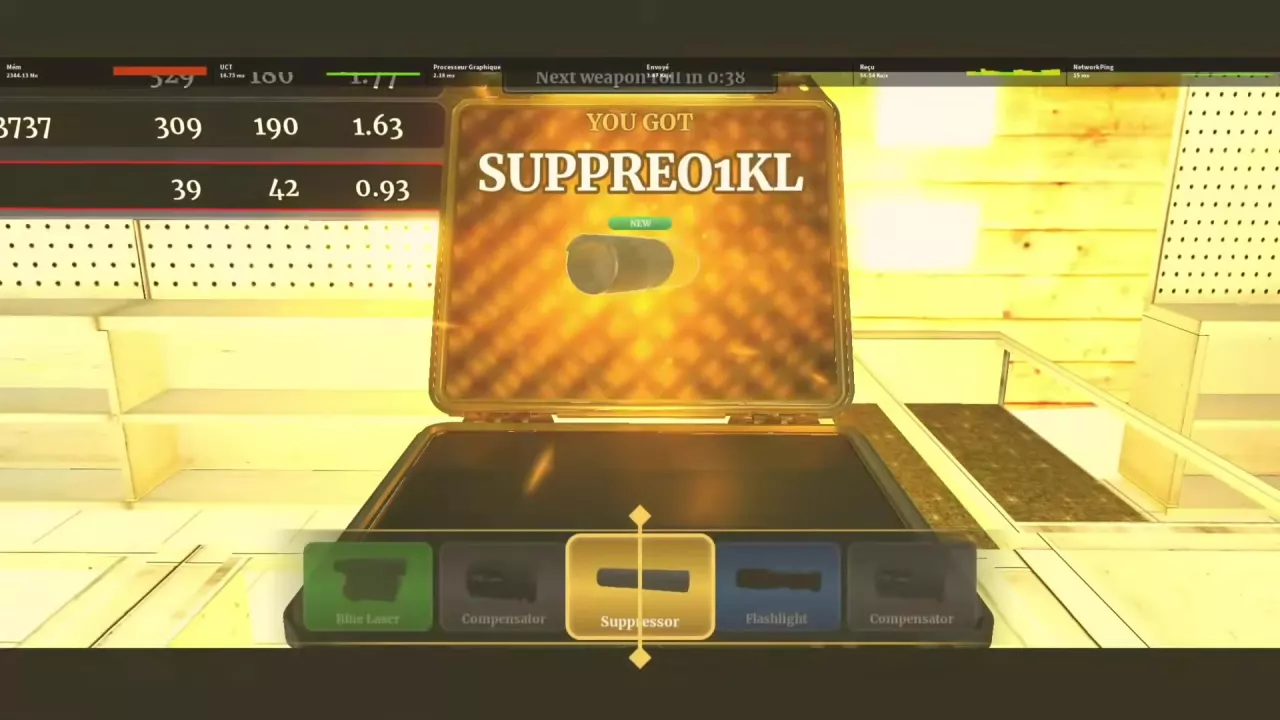
Suppressor selected beneath the central gold pointer, with YOU GOT and NEW above the reward.

Permanent Case-Animation Skipping

The Skip case animation (Permanent) game pass provides permanent case-animation skipping. Choose this pass if you want to skip the reward-roll animation.

See the Urban Reload game pass listings for its listed Robux price and the other passes.

Search the wiki

Urban Reload Beginner Guide: Getting StartedStart Urban Reload on Roblox, learn how fighting, looting and cash fit together, and prepare your hotbar, ammo and healing supplies before street PvP.How to Open the Menu in Urban Reload and Read Your HotbarHold ALT to unlock the cursor in Urban Reload, then click a menu. Find Crew and Shop and recognize the numbered and L1/R1 hotbar layouts.Urban Reload Combat Guide: Street PvPImprove street PvP in Urban Reload with a practical loadout, aiming tips, corner movement, flank responses, knockdown recognition and Medkit healing.Urban Reload Combat Supplies: Medkit and Purple BottleIdentify Urban Reload combat supplies, heal with a Medkit, and use the purple bottle’s 15-second status timer, including how drinking again refreshes it.
How to Open the Menu in Urban Reload and Read Your HotbarHold ALT to unlock the cursor in Urban Reload, then click a menu. Find Crew and Shop and recognize the numbered and L1/R1 hotbar layouts.Urban Reload Weapon Types, M4 and Ammo HUDIdentify Urban Reload weapon types, check the M4 beta setup’s 30-round magazine, read the ammo HUD, and understand weapon loss and the weapon-roll timer.Urban Reload Combat Supplies: Medkit and Purple BottleIdentify Urban Reload combat supplies, heal with a Medkit, and use the purple bottle’s 15-second status timer, including how drinking again refreshes it.
Urban Reload Combat Guide: Street PvPImprove street PvP in Urban Reload with a practical loadout, aiming tips, corner movement, flank responses, knockdown recognition and Medkit healing.Urban Reload Combat Supplies: Medkit and Purple BottleIdentify Urban Reload combat supplies, heal with a Medkit, and use the purple bottle’s 15-second status timer, including how drinking again refreshes it.Urban Reload Kill Rewards and Cash SourcesLearn how Urban Reload kill rewards work: confirm PvP kills, read green cash payouts, compare individual reward examples, and recognize the Farm Zone marker.Urban Reload Weapon Types, M4 and Ammo HUDIdentify Urban Reload weapon types, check the M4 beta setup’s 30-round magazine, read the ammo HUD, and understand weapon loss and the weapon-roll timer.
Urban Reload Weapon Types, M4 and Ammo HUDIdentify Urban Reload weapon types, check the M4 beta setup’s 30-round magazine, read the ammo HUD, and understand weapon loss and the weapon-roll timer.Urban Reload Attachment List and Case SourcesBrowse 10 Urban Reload attachments by name, type and case. Find the case for Suppressor, Double Drum, grips, lasers, muzzle devices and Flashlight.Urban Reload Combat Guide: Street PvPImprove street PvP in Urban Reload with a practical loadout, aiming tips, corner movement, flank responses, knockdown recognition and Medkit healing.
Urban Reload Attachment List and Case SourcesBrowse 10 Urban Reload attachments by name, type and case. Find the case for Suppressor, Double Drum, grips, lasers, muzzle devices and Flashlight.Urban Reload Cases: Types and Reward ChoicesChoose Urban Reload cases for DarkMatter, White Chrome, Suppressor or Double Drum. Compare reward candidates, read YOU GOT results and find the animation-skip pass.
Urban Reload Combat Supplies: Medkit and Purple BottleIdentify Urban Reload combat supplies, heal with a Medkit, and use the purple bottle’s 15-second status timer, including how drinking again refreshes it.Urban Reload Weapon Types, M4 and Ammo HUDIdentify Urban Reload weapon types, check the M4 beta setup’s 30-round magazine, read the ammo HUD, and understand weapon loss and the weapon-roll timer.Urban Reload Combat Guide: Street PvPImprove street PvP in Urban Reload with a practical loadout, aiming tips, corner movement, flank responses, knockdown recognition and Medkit healing.
Urban Reload Combat Supplies: Medkit and Purple BottleIdentify Urban Reload combat supplies, heal with a Medkit, and use the purple bottle’s 15-second status timer, including how drinking again refreshes it.Urban Reload Combat Guide: Street PvPImprove street PvP in Urban Reload with a practical loadout, aiming tips, corner movement, flank responses, knockdown recognition and Medkit healing.How to Open the Menu in Urban Reload and Read Your HotbarHold ALT to unlock the cursor in Urban Reload, then click a menu. Find Crew and Shop and recognize the numbered and L1/R1 hotbar layouts.
Urban Reload Kill Rewards and Cash SourcesLearn how Urban Reload kill rewards work: confirm PvP kills, read green cash payouts, compare individual reward examples, and recognize the Farm Zone marker.Urban Reload Locations: Farm Zone, Pharmacy and Safe ZoneFind Urban Reload locations using the Farm Zone skull marker, Gem Dealers sign and pharmacy plaza. Recognize Central Pharmacy and the Safe Zone interior.
Urban Reload Cases: Types and Reward ChoicesChoose Urban Reload cases for DarkMatter, White Chrome, Suppressor or Double Drum. Compare reward candidates, read YOU GOT results and find the animation-skip pass.Urban Reload Attachment List and Case SourcesBrowse 10 Urban Reload attachments by name, type and case. Find the case for Suppressor, Double Drum, grips, lasers, muzzle devices and Flashlight.Urban Reload Camos: Patterns, Finishes and Case SourcesBrowse 10 Urban Reload camos by name, appearance and case source. Find DarkMatter, White Chrome, patterned wraps and colored Gloss finishes.Urban Reload Game Passes and Robux PricesFind Urban Reload game pass listings, Robux prices and official product links. Compare Crew-related prices and find the permanent case-animation skip pass.
Urban Reload Camos: Patterns, Finishes and Case SourcesBrowse 10 Urban Reload camos by name, appearance and case source. Find DarkMatter, White Chrome, patterned wraps and colored Gloss finishes.Urban Reload Cases: Types and Reward ChoicesChoose Urban Reload cases for DarkMatter, White Chrome, Suppressor or Double Drum. Compare reward candidates, read YOU GOT results and find the animation-skip pass.Urban Reload Creator Perks: Skies, Tracers and Kill EffectsLearn why some Urban Reload creators have custom skies, bullet tracers and chosen kill effects, and how these perks differ from gun camos.
Urban Reload Locations: Farm Zone, Pharmacy and Safe ZoneFind Urban Reload locations using the Farm Zone skull marker, Gem Dealers sign and pharmacy plaza. Recognize Central Pharmacy and the Safe Zone interior.Urban Reload Kill Rewards and Cash SourcesLearn how Urban Reload kill rewards work: confirm PvP kills, read green cash payouts, compare individual reward examples, and recognize the Farm Zone marker.
Urban Reload Game Passes and Robux PricesFind Urban Reload game pass listings, Robux prices and official product links. Compare Crew-related prices and find the permanent case-animation skip pass.How to Open the Menu in Urban Reload and Read Your HotbarHold ALT to unlock the cursor in Urban Reload, then click a menu. Find Crew and Shop and recognize the numbered and L1/R1 hotbar layouts.
Urban Reload Game Passes and Robux PricesFind Urban Reload game pass listings, Robux prices and official product links. Compare Crew-related prices and find the permanent case-animation skip pass.Urban Reload Cases: Types and Reward ChoicesChoose Urban Reload cases for DarkMatter, White Chrome, Suppressor or Double Drum. Compare reward candidates, read YOU GOT results and find the animation-skip pass.
Urban Reload Creator Perks: Skies, Tracers and Kill EffectsLearn why some Urban Reload creators have custom skies, bullet tracers and chosen kill effects, and how these perks differ from gun camos.Urban Reload Camos: Patterns, Finishes and Case SourcesBrowse 10 Urban Reload camos by name, appearance and case source. Find DarkMatter, White Chrome, patterned wraps and colored Gloss finishes.