Weapons / PLAYER GUIDE

Urban Reload M4: Stats, Case and Attachments

Last updated:

The M4 is a Legendary rifle in Urban Reload. Find its case source, understand its listed stats, and browse the attachment options available in its Armory menu.

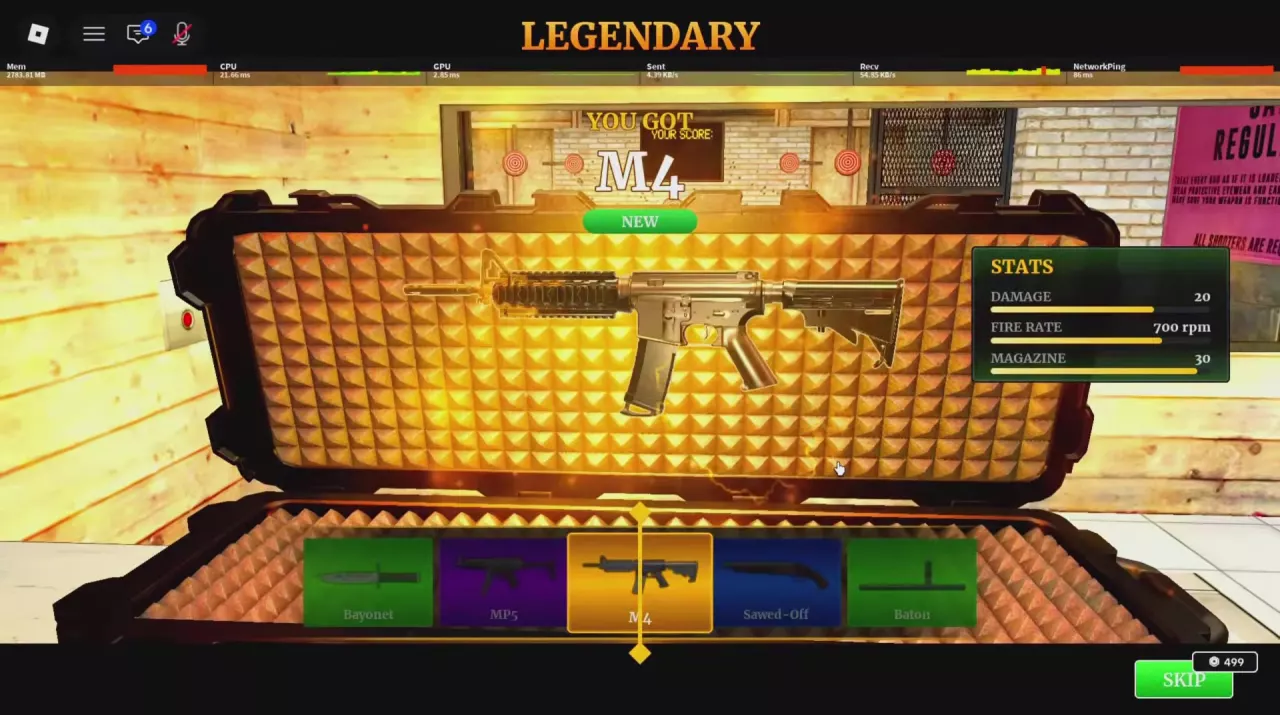
M4 reward screen listing damage 20, fire rate 700 rpm and magazine 30.
On this page

Look up the M4's listed stats, Legendary Case source and Armory attachment options.

M4

Type
Rifle
Magazine capacity
30 rounds (M4 setup used in the beta street and plaza fights; also listed as MAGAZINE 30 on the M4 reward panel)
Combat use
Over-the-shoulder aiming in streets, alleys and plazas
Appearance
Bright green (Green M4 configuration)
Reported acquisition spending
1500000 (One player's stated spending exceeded this amount to obtain an M4; this is an individual total, not a fixed price or guarantee)
Rarity
LEGENDARY (M4 reward panel and Legendary Case menu)
Listed damage
20 (DAMAGE value on the M4 reward panel)
Fire rate
700 rpm (M4 reward panel)
Acquisition case
Legendary Case (Random weapon reward)
Drop chance
6 % (Legendary Case ODDS menu)
Armory option
Red Dot (M4 Armory: Sights)
Armory option
Holographic (M4 Armory: Sights)
Armory option
ACOG (M4 Armory: Sights)
Armory option
Dual Sight (M4 Armory: Sights)
Armory option
Compensator (M4 Armory: Muzzle)
Armory option
Muzzle Brake (M4 Armory: Muzzle)
Armory option
Suppressor (M4 Armory: Muzzle)
Armory option
Vertical Grip (M4 Armory: Underbarrel)
Armory option
Angled Grip (M4 Armory: Underbarrel)
Armory option
Bipod (M4 Armory: Underbarrel)
Armory option
Red Laser (M4 Armory: Laser / Light)
Armory option
Blue Laser (M4 Armory: Laser / Light)
Armory option
Green Laser (M4 Armory: Laser / Light)
Armory option
Flashlight (M4 Armory: Laser / Light)
Armory option
Green Flashlight (M4 Armory: Laser / Light)
Armory option
Purple Laser (M4 Armory: Laser / Light)
Armory option
Red Flashlight (M4 Armory: Laser / Light)
Armory option
Double Laser (M4 Armory: Laser / Light)
Armory option
White Laser (M4 Armory: Laser / Light)
Armory option
Default Mag (M4 Armory: Magazine)
Armory option
Drum Mag (M4 Armory: Magazine)
Armory option
Double Drum (M4 Armory: Magazine)
ObjectRelationship to M4QuantityConditions
Legendary CaseCan award—Random reward

M4 Stats and Magazine

The M4 reward panel labels the rifle LEGENDARY and lists DAMAGE 20, FIRE RATE 700 rpm and MAGAZINE 30. The fire-rate unit means rounds per minute. DAMAGE 20 is a panel value; it does not establish a fixed 20 damage for every body part, distance and armor condition.

The 30-round listing also matches the M4 configuration used in beta street and plaza fights. The 30-round capacity listed for this weapon setup does not establish the capacity of every magazine option in Armory. Likewise, bright green describes a particular M4 configuration, not a required appearance.

For current-round counts and weapon-roll indicators, use the ammo HUD guide. For combat preparation and positioning, see the street PvP guide.

M4 reward screen listing damage 20, fire rate 700 rpm and magazine 30.

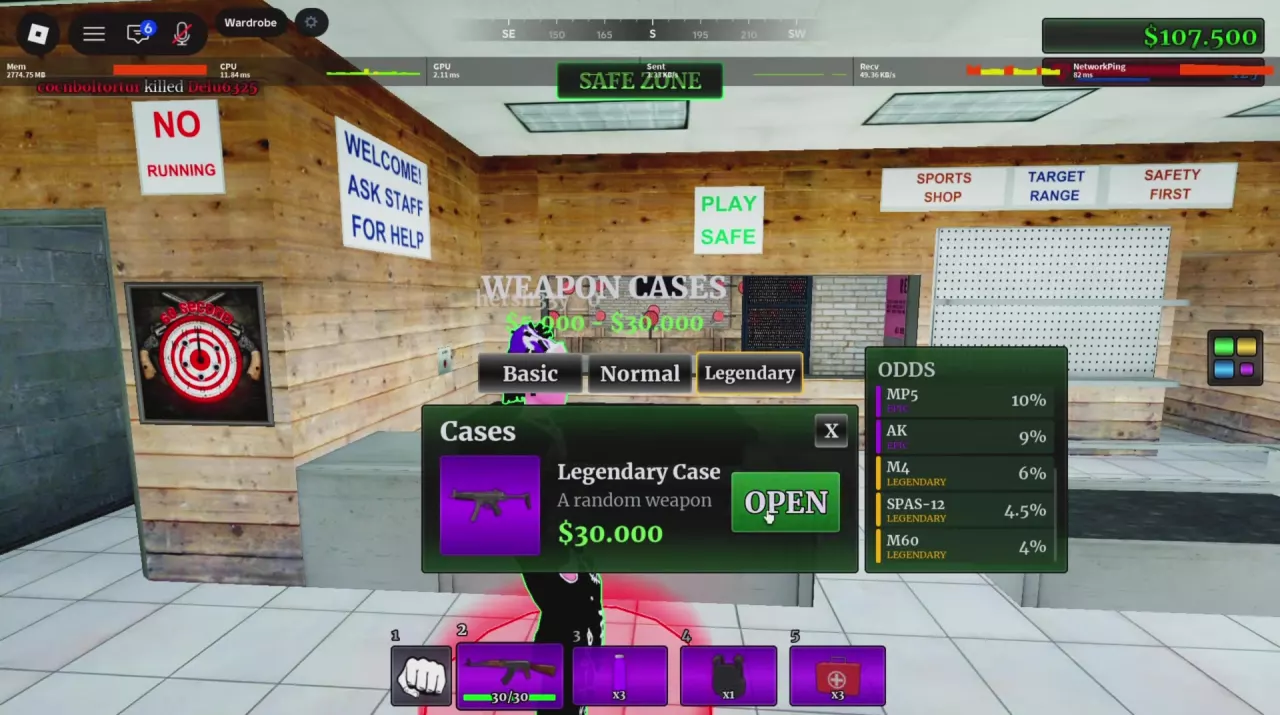
Get the M4 from Legendary Case

  1. Go to the Weapon Cases counter inside Gun Shop, the store marked QUICK GUNS.
  2. Open the Cases menu and select Legendary.
  3. Choose OPEN to spend 30,000 in-game cash on one random weapon reward.
  4. Read the final YOU GOT result. An M4 reward is labeled M4 and displays its stats.

The Legendary Case ODDS menu lists the M4 at 6%. An opening can award another weapon, so budget for random outcomes: the listed chance does not promise an M4 within a particular number of openings.

The 30,000 cash price buys one case opening. A player's cumulative spending to obtain an M4 is an individual total, not a fixed purchase price for the rifle. The 499 Robux label beside SKIP belongs to the animation-skip control, not the case-opening price.

See case types and reward choices to compare weapon, attachment and camo cases.

Legendary Case menu showing the 30,000 cash price, OPEN button and M4 odds of 6%.

M4 Armory Options

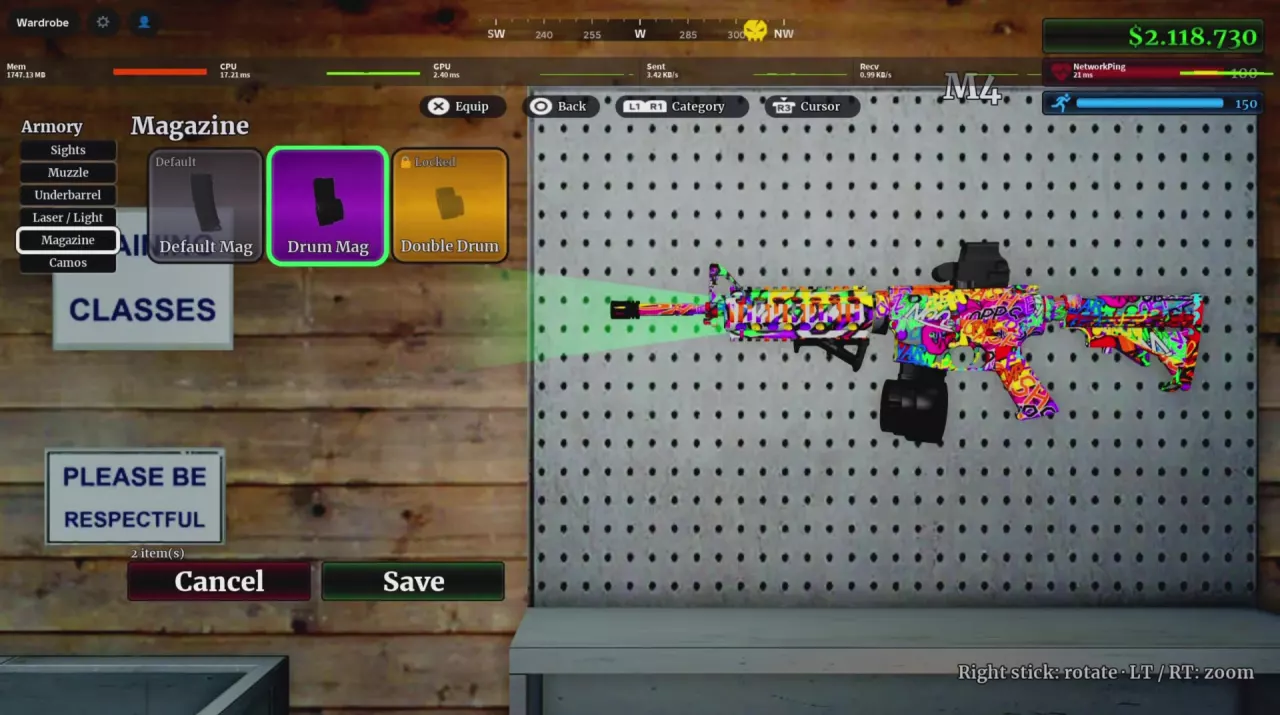
Browse the M4's attachment options by their Armory categories: Sights, Muzzle, Underbarrel, Laser / Light and Magazine. Camos is a separate menu category for the weapon's finish.

Keep these similarly named options separate:

  • Drum Mag and Double Drum are different Magazine entries. Drum Mag has a single round drum; Double Drum has two joined drums. Default Mag carries the Default label.
  • Green Laser and Green Flashlight are different Laser / Light entries. The Green Flashlight configuration projects a forward green beam.

To access the menu, take your M4 to the yellow floor circle beside the GUNS neon window inside Gun Shop. Armory opens for your current weapon. Select an attachment you own and use the displayed Equip control; unavailable items are marked Locked.

Use the Armory guide for the entrance and controller prompts. To find the case source for a particular attachment, browse the attachment directory.

M4 Armory Magazine category with Default Mag, Drum Mag and Double Drum entries.

Search the wiki

Urban Reload Beginner Guide: Getting StartedStart Urban Reload on Roblox, learn how fighting, looting and cash fit together, and prepare your hotbar, ammo and healing supplies before street PvP.How to Open the Menu in Urban Reload and Read Your HotbarHold ALT to unlock the cursor in Urban Reload, then click a menu. Find Crew and Shop and recognize the numbered and L1/R1 hotbar layouts.Urban Reload Combat Guide: Street PvPImprove street PvP in Urban Reload with a practical loadout, aiming tips, corner movement, flank responses, knockdown recognition and Medkit healing.Urban Reload Combat Supplies: Medkit and Purple BottleIdentify Urban Reload combat supplies, equip KEVLAR, heal with a Medkit, and use the purple bottle’s 15-second status timer, including how drinking again refreshes it.
How to Open the Menu in Urban Reload and Read Your HotbarHold ALT to unlock the cursor in Urban Reload, then click a menu. Find Crew and Shop and recognize the numbered and L1/R1 hotbar layouts.Urban Reload Weapon Types, M4 and Ammo HUDIdentify Urban Reload weapon types, check the M4 beta setup’s 30-round magazine, read the ammo HUD, and understand weapon loss and the weapon-roll timer.Urban Reload Combat Supplies: Medkit and Purple BottleIdentify Urban Reload combat supplies, equip KEVLAR, heal with a Medkit, and use the purple bottle’s 15-second status timer, including how drinking again refreshes it.
Urban Reload Combat Guide: Street PvPImprove street PvP in Urban Reload with a practical loadout, aiming tips, corner movement, flank responses, knockdown recognition and Medkit healing.Urban Reload Combat Supplies: Medkit and Purple BottleIdentify Urban Reload combat supplies, equip KEVLAR, heal with a Medkit, and use the purple bottle’s 15-second status timer, including how drinking again refreshes it.Urban Reload Kill Rewards and Cash SourcesLearn how Urban Reload kill rewards work: confirm PvP kills, read green cash payouts, compare individual reward examples, and recognize the Farm Zone marker.Urban Reload Weapon Types, M4 and Ammo HUDIdentify Urban Reload weapon types, check the M4 beta setup’s 30-round magazine, read the ammo HUD, and understand weapon loss and the weapon-roll timer.
Urban Reload Weapon Types, M4 and Ammo HUDIdentify Urban Reload weapon types, check the M4 beta setup’s 30-round magazine, read the ammo HUD, and understand weapon loss and the weapon-roll timer.Urban Reload M4: Stats, Case and AttachmentsGet the Urban Reload M4 from Legendary Case: 6% listed odds and 30,000 cash per opening. Read its damage, fire rate, magazine and Armory options.Urban Reload Attachment List and Case SourcesBrowse the Urban Reload attachment list by name, type and case. Find sights, grips and magazines, listed drop chances and M4 Armory categories.Urban Reload Combat Guide: Street PvPImprove street PvP in Urban Reload with a practical loadout, aiming tips, corner movement, flank responses, knockdown recognition and Medkit healing.Urban Reload Cases: Types and Reward ChoicesChoose Urban Reload weapon, attachment and camo cases. Compare listed prices and reward odds, use OPEN at Gun Shop, and understand YOU GOT and SKIP.
Urban Reload Attachment List and Case SourcesBrowse the Urban Reload attachment list by name, type and case. Find sights, grips and magazines, listed drop chances and M4 Armory categories.How to Equip Attachments in Urban ReloadLearn how to equip attachments in Urban Reload: find the Gun Shop's yellow Armory circle, choose owned attachments and read the controller prompts.Urban Reload Cases: Types and Reward ChoicesChoose Urban Reload weapon, attachment and camo cases. Compare listed prices and reward odds, use OPEN at Gun Shop, and understand YOU GOT and SKIP.
Urban Reload Combat Supplies: Medkit and Purple BottleIdentify Urban Reload combat supplies, equip KEVLAR, heal with a Medkit, and use the purple bottle’s 15-second status timer, including how drinking again refreshes it.Urban Reload Weapon Types, M4 and Ammo HUDIdentify Urban Reload weapon types, check the M4 beta setup’s 30-round magazine, read the ammo HUD, and understand weapon loss and the weapon-roll timer.Urban Reload Combat Guide: Street PvPImprove street PvP in Urban Reload with a practical loadout, aiming tips, corner movement, flank responses, knockdown recognition and Medkit healing.
Urban Reload Combat Supplies: Medkit and Purple BottleIdentify Urban Reload combat supplies, equip KEVLAR, heal with a Medkit, and use the purple bottle’s 15-second status timer, including how drinking again refreshes it.Urban Reload Combat Guide: Street PvPImprove street PvP in Urban Reload with a practical loadout, aiming tips, corner movement, flank responses, knockdown recognition and Medkit healing.How to Open the Menu in Urban Reload and Read Your HotbarHold ALT to unlock the cursor in Urban Reload, then click a menu. Find Crew and Shop and recognize the numbered and L1/R1 hotbar layouts.
Urban Reload Kill Rewards and Cash SourcesLearn how Urban Reload kill rewards work: confirm PvP kills, read green cash payouts, compare individual reward examples, and recognize the Farm Zone marker.Urban Reload Farm Zone Farming GuideFind Urban Reload's Farm Zone, fight pursuing NPCs while moving, collect cash from their bodies, and recognize the local Safe Zone indicator.Urban Reload Locations: Farm Zone, Pharmacy and Safe ZoneFind Urban Reload locations using Farm Zone signs and its skull marker. Find Gun Shop's cases and Armory, and recognize Safe Zone labels.
Urban Reload Cases: Types and Reward ChoicesChoose Urban Reload weapon, attachment and camo cases. Compare listed prices and reward odds, use OPEN at Gun Shop, and understand YOU GOT and SKIP.Urban Reload Attachment List and Case SourcesBrowse the Urban Reload attachment list by name, type and case. Find sights, grips and magazines, listed drop chances and M4 Armory categories.Urban Reload Camos: Patterns, Finishes and Case SourcesBrowse 10 Urban Reload camos by name, appearance and case source. Find DarkMatter, White Chrome, patterned wraps and colored Gloss finishes.Urban Reload Game Passes and Robux PricesFind Urban Reload game pass listings, Robux prices and official product links. Compare Crew-related prices and find the permanent case-animation skip pass.
Urban Reload Camos: Patterns, Finishes and Case SourcesBrowse 10 Urban Reload camos by name, appearance and case source. Find DarkMatter, White Chrome, patterned wraps and colored Gloss finishes.Urban Reload Cases: Types and Reward ChoicesChoose Urban Reload weapon, attachment and camo cases. Compare listed prices and reward odds, use OPEN at Gun Shop, and understand YOU GOT and SKIP.Urban Reload Creator Perks: Skies, Tracers and Kill EffectsLearn why some Urban Reload creators have custom skies, bullet tracers and chosen kill effects, and how these perks differ from gun camos.
Urban Reload Locations: Farm Zone, Pharmacy and Safe ZoneFind Urban Reload locations using Farm Zone signs and its skull marker. Find Gun Shop's cases and Armory, and recognize Safe Zone labels.Urban Reload Kill Rewards and Cash SourcesLearn how Urban Reload kill rewards work: confirm PvP kills, read green cash payouts, compare individual reward examples, and recognize the Farm Zone marker.Urban Reload Farm Zone Farming GuideFind Urban Reload's Farm Zone, fight pursuing NPCs while moving, collect cash from their bodies, and recognize the local Safe Zone indicator.How to Equip Attachments in Urban ReloadLearn how to equip attachments in Urban Reload: find the Gun Shop's yellow Armory circle, choose owned attachments and read the controller prompts.Urban Reload Leaderboards: Location and CategoriesFind Urban Reload’s leaderboard outside QUICK GUNS and understand the KILLS, K/D and MONEY categories under the OVERALL · BETA SEASON label.
Urban Reload Cars: Shooting While Driving and LOCKEDYou can shoot while driving a blue four-door sedan in Urban Reload. Find the LOCKED vehicle status label and the L key prompt beside it.
Urban Reload Game Passes and Robux PricesFind Urban Reload game pass listings, Robux prices and official product links. Compare Crew-related prices and find the permanent case-animation skip pass.How to Open the Menu in Urban Reload and Read Your HotbarHold ALT to unlock the cursor in Urban Reload, then click a menu. Find Crew and Shop and recognize the numbered and L1/R1 hotbar layouts.
Urban Reload Leaderboards: Location and CategoriesFind Urban Reload’s leaderboard outside QUICK GUNS and understand the KILLS, K/D and MONEY categories under the OVERALL · BETA SEASON label.
Urban Reload Game Passes and Robux PricesFind Urban Reload game pass listings, Robux prices and official product links. Compare Crew-related prices and find the permanent case-animation skip pass.Urban Reload Cases: Types and Reward ChoicesChoose Urban Reload weapon, attachment and camo cases. Compare listed prices and reward odds, use OPEN at Gun Shop, and understand YOU GOT and SKIP.
Urban Reload Creator Perks: Skies, Tracers and Kill EffectsLearn why some Urban Reload creators have custom skies, bullet tracers and chosen kill effects, and how these perks differ from gun camos.Urban Reload Camos: Patterns, Finishes and Case SourcesBrowse 10 Urban Reload camos by name, appearance and case source. Find DarkMatter, White Chrome, patterned wraps and colored Gloss finishes.